| Development tools |
Develop and debug applications and customize Linux with ease.
TimeSys's development tools deliver a complete set of Eclipse-based, graphical tools that makes it easy for you to develop, debug, and deploy embedded applications, customize and extend the Linux kernel, and customize the filesystem and applications that you are deploying on your embedded applications.
TimeSys's development tools run on Linux and Windows systems and are seamlessly integrated with your target embedded hardware through simple, graphical configuration commands.
TimeSys's development tools are bundled with the LinkLink Developer Suite.
Read more:
- IDE for Creating and Editing Code
- Graphical Support for Managing Multiple Projects
- Flexible Support for all Linux Distributions
- Easy Cross-Compilation and Target Management
- Remote, Multi-Threaded Debugging
- Easy-to-Use Target Configuration and Customization
- Key Benefits
- System Requirements
- Powerful Companion Tools
IDE for Creating and Editing Code
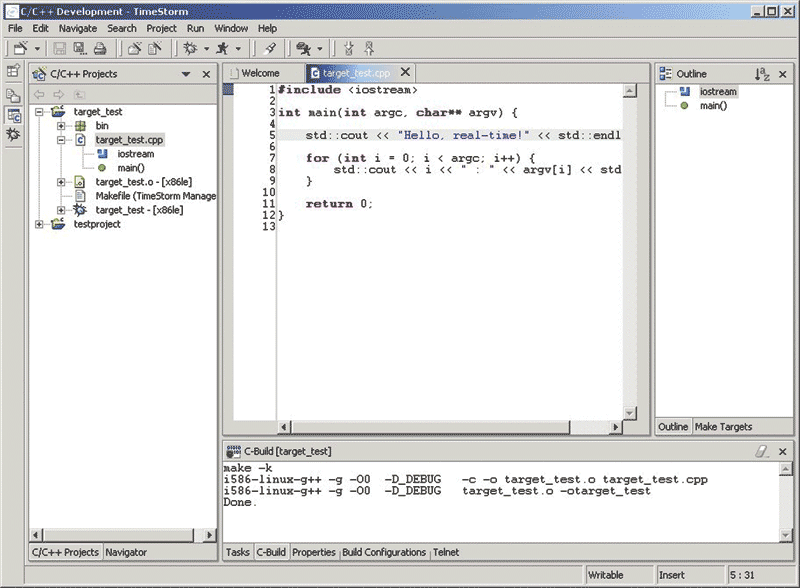
TimeSys's development tools leverage the latest Eclipse technologies to provide a complete, graphical development environment for all of your application development and Linux customization needs. (Click here for a larger view)
TimeSys's development tools include a powerful Integrated Development Environment (IDE) for application development and system configuration. The code editor can handle simple or complex team projects with multiple users, large files, or large numbers of files and provides an easy-to-use interface for the fast creation of Linux application programs, Linux kernel modifications, or Linux device driver development. The IDE makes it easy to:
- Create projects using the integrated Project Wizard
- Use the Import/Export Wizard to bring in or export existing projects
- Perform automatic code formatting
- Highlight matching braces and use color coding to highlight keywords, string literals, and numeric literals
- Perform block operations
- Define macros
- Perform full and incremental searches
- Use bookmarks to mark specific project components or locations
Graphical Support for Managing Multiple Projects
TimeSys's development tools make it easy to create, view, manage and switch between multiple development projects. More than 10 integrated project wizards make it easy for you to create various types of project templates, including C, C++, and Java applications, customized kernel projects, device drivers, and different types of Linux filesystems. The user interface provides a concise, easy-to-use navigation pane that simplify switching between multiple projects, while other panes enable you to simultaneously edit components from multiple projects.
Project management features enable you to:
- Start multiple projects and revisit them whenever you wish
- Share files between projects
- Create patches to existing projects and easily apply external patches to your projects
- Identify, compare, and browse changes between project source files using integrated diff capabilities
- Reorganize window and pane layout and save customized user interface settings for subsequent re-use
- Associate multiple sets of build/compilation settings with single projects that are being compiled for multiple platforms
- Work on multiple projects simultaneously
Flexible Support for All Linux Distribution
TimeSys's development tools are designed to work with any Linux distribution from any vendor. Whether you are using a Linux distribution from TimeSys, another Linux platform, or are rolling your own, TimeSys's development tools can help you to meet your deadlines and quickly and easily customize and deploy Linux on your target hardware.
Fine-tune and optimize any Linux distribution that features:
- 2.4 or 2.6-based Linux kernels
- Source code for the kernel and device drivers
- Complete GNU toolchains including gdb
Easy Cross-Compilation and Target Management
The IDE easily generates executable code for your target hardware and simplifies target management by providing an intuitive process for communicating with the board and downloading and installing applications. Step-by-step prompts identify all of the parameters required for establishing communication with the board and tranferring files for debugging, testing, and deployment.
You can:
- Develop and cross-compile your applications on Linux, Windows, and Solaris desktop systems
- Associate different toolchains with different projects, and easily switch between toolchains for existing projects
- Define customized development configurations for debugging and deployment
- Easily tranfer applications and any associated files to your embedded target hardware
- Customize the location where applications, libraries, and other files will be installed on your target hardware
Remote, Multi-Threaded Debugging
TimeSys's development tools include a sophisticated debugger that makes debugging applications on embedded hardware as easy as debugging desktop applications. It provides a graphical interface to the GNU debugger (gdb) and to remote GDB debugging processes. TimeSys's development tools also support local and remote debugging of multi-threaded applications.
The development tools make it easy for you to graphically:
- Examine and evaluate the contents of registers, variables, memory, and stack
- Drill down to view complex data structures anbd evaluate C expressions
- See variable values by simply moving the mouse
- Get register views for your architecture
- View the stack for each thread or process
- Define conditional breakpoints with a single mouse click
Easy-to-Use Target Configuration and Customization
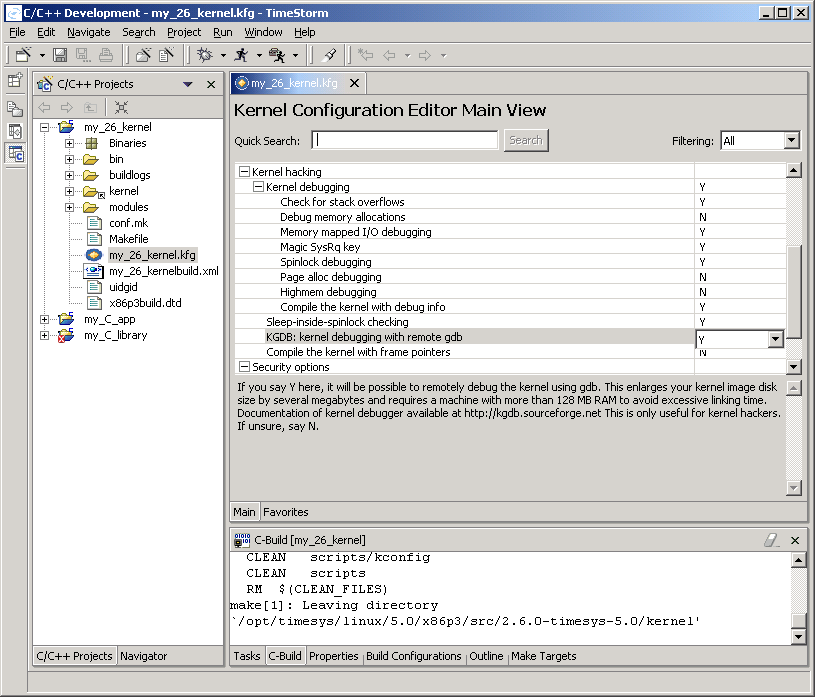
One of the new features of the Target Configurator is an Eclipse-based kernel configuration editor for editing Linux 2.6-based kernel configurations. You can select it on a workspace, project or site basis. (Click here for a larger view)
Regardless of the Linux distribution that you are using, you will want to add your custom applications to the Linux filesystems that you plan to deploy.
The Target Configurator delivers complete control over kernel configuration, kernel compilation, and the contents of the filesystem(s) on your target hardware. With the Target Configurator, you can:
- Select from several kernel configurations tailored for performance, debugging, and application development
- Define custom kernel configurations to reduce size or further optimize performance
- Easily search kernel configuration variables, descriptions, and help text to quickly locate related drivers and settings
- Bookmark recent kernel configuration changes or configuration areas, making it easy to locate and experiment with complex groups of related settings
- Create different types of root filesystems, including initial RAM disks, local or NFS-mounted EXT2 or EXT3, and JFFS2
- Graphically add packages and custom applications to your target root filesystem
Key Benefits Summary
- Reduced cost of development:
- Implement a proven path to successful development
- Eliminate unnecessary research and development
- Understand development criteria to avoid mistakes
- Design control:
- Utilize the availability of Linux source code
- Customize the tools to match your design team's level of expertise
- Performance expectations:
- Start with Linux distribution from TimeSys or any general purpose Linux distribution
- Accelerate development with seamlessly integrated tools
- Deliver full Linux support to application developers
System Requirements
Target Requirements:
Operates with any Linux based on Linux 2.6 or 2.4.
Host Requirements:
- Host Hardware
- To install on a Windows or Linux host, your system must satisfy these hardware requirements:
- Intel Pentium-class processor
- 256 MB (or better) RAM
- 163 MB disk space
- Ethernet connection to the target system
- Serial port console or terminal connection to the target system
- Host Software
- To install on a Linux host, your system must satisfy these software requirements:
- Windows® (2000 Professional or XP Professional), Red Hat Linux 9, Red Hat Enterprise WS, SuSE 9.1, Fedora Core 2
- On Windows systems, TimeStorm uses any HTML browser
- On Linux systems, TimeStorm uses Mozilla
- Java Runtime Environment (JRE) 1.4 (automatically installed on the host)
- JDBC-compliant database (HSQLDB provided)
- Cygwin 1.5
Powerful Companion Tools
Develop, debug, and deploy custom applications, customized versions of the Linux kernel, support for specialized devices, and filesystems that contain the applications that your embedded systems need to run. To help automate testing your applications or deployed Linux systems, TimeSys offers a testing tool and framework that helps you write and automate tests to avoid the risk of delivering a partially operable package, minimize your time to market by eliminating the cumbersome task of creating test scenarios from scratch, and ensure that your product functions as expected—before it goes to market.
TimeSys testing tools are also based on the Eclipse framework and are completely interoperable with TimeSys development tools. The testing tools work with any Linux distribution.